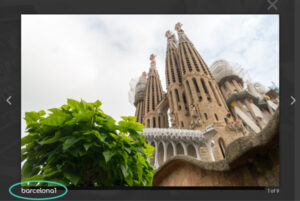
Colocar no CSS do site:
.mfp-title { display: none !important; }
Para remover a contagem (1 of 9), adicionar tb este:
.mfp-counter { display: none !important; }
Colocar no CSS do site:
.mfp-title { display: none !important; }
Para remover a contagem (1 of 9), adicionar tb este:
.mfp-counter { display: none !important; }
Adicionar no CSS do SITE ou da PÁGINA o seguinte:
@media (max-width: 479px){
.et_pb_column .et_pb_grid_item {
margin: 0 5.5% 9.5% 0;
width: 47.25%;
}}
Colocar na class do item do menu:
head_button_pt et_pb_button et_pb_button_0
Colocar no CSS do site:
/* Style Head button */
.head_button_pt > a{
padding-bottom: 0 !important;
color: white !important;
}
.et_mobile_menu li.head_button_pt.et_pb_button a {
padding:0;
}
https://almostinevitable.com/divi-tutorial-video-background-hero-section/
https://divisoup.com/boxed-testimonial-slider-demo/
Referência: https://divilife.com/create-fixed-mobile-menu-divi/
@media (max-width: 980px) {
.et_non_fixed_nav.et_transparent_nav #main-header, .et_non_fixed_nav.et_transparent_nav #top-header, .et_fixed_nav #main-header, .et_fixed_nav #top-header {
position: fixed;
}
}
.et_mobile_menu {
overflow: scroll !important;
max-height: 83vh;
}
Adicionar na ROW (verde) o seguinte código:
display: -webkit-box;
display: -ms-flexbox;
display: flex;
-webkit-box-align: center;
-ms-flex-align: center;
align-items: center;
-webkit-box-orient: horizontal;
-webkit-box-direction: normal;
-ms-flex-direction: row;
flex-direction: row;
-ms-flex-wrap: wrap;
flex-wrap: wrap;
https://www.elegantthemes.com/blog/divi-resources/add-more-columns-to-your-divi-builder-posts-or-pages
/*** Take out the divider line between content and sidebar ***/

#main-content .container:before {background: none;}
/*** Expand the content area to fullwidth ***/

@media (min-width: 981px){

#left-area {

width: 100%;

padding: 23px 0px 0px !important;

float: none !important;

}

}
https://www.elegantthemes.com/blog/divi-resources/how-to-remove-sidebars-from-divi